Please Wait a Moment
X

Infor LX Tips, Infor LN Tips, BPCS Tips, Baan Tips, Infor M3 Tips & Infor ERP News

Crossroads Connections

Infor ERP Tips & News from the Experts

Infor LX | Infor LN | BPCS | Baan | Infor M3

BPCS/LX Tip of the Week: Receiving to Inspection

Anthony Etzel 0 67036 Article rating: No rating

If the item being received needs to be inspected prior to being available for use, there are two schools of thought.The first is to receive the item to a QC hold location. The downside is the item will show up in on hand inventory.

A better method would be to do a PO receipt to inspection. Both Inv500 and Pur550 support this method. Now you have received the item without showing it in inventory. Only the PO quantity in inspection is updated. This method also allows you to create an Inspection Dispatch Report. After the QC process for the item is complete, then the transaction Receipt from Inspection to Stock is processed. That transaction then updates the PO quantity received field and the Item on hand field in inventory.


Baan/LN Tip of the Week: Transaction Accounts – Commissions

Kathy Barthelt 0 105746 Article rating: No rating

In Baan IV, if a link with Financials exists for commissions and rebates, invoices are created directly in the Commission Control System (CMS) module and posted to Financials. As a result, users must specify the ledger accounts that are used for posting commissions and rebates in the Maintain Commission/Rebate Transaction Accounts (tdcms2101m000) session.

In LN, the Maintain Commission/Rebate Transaction Accounts (tdcms2101m000) session is removed from the Commission Control System (CMS) module, because invoices are no longer created directly in the Commission Control System module.

Grindmaster-Cecilware Selects NextTrack Sales For Sales Analysis

Kathy Barthelt 0 42324 Article rating: No rating

Grindmaster-Cecilware (GMCW), a leading provider of products for the food and beverage industry, has selected NextTrack Sales to satisfy their sales analysis requirements. Integrated with their Baan ERP system, NextTrack Sales provides sophisticated pivot grid and charting functionality, and the ability to generate any number of views of the data, all without customizing their ERP system. Grindmaster’s VP of Sales said it was "the perfect fit for him, and covered all of his reporting needs".

Peerless Instrument Selects Crossroads RMC for Baan Data Collection

Kathy Barthelt 0 36419 Article rating: No rating

Peerless Instrument, a division of Curtiss Wright, has selected Crossroads RMC for Baan data collection. Peerless is interested in furthering the data collection partnership that Curtiss Wright began with Crossroads RMC 20 years ago. The data collection implementation will include Receiving, Material Issue, Inspection and Report Operations Complete, and is expected to be completed in July of 2016. 

Peerless Instrument provides state-of-the-art electronic components, systems, and software to the US military. Peerless' advanced instrumentation and control systems are not only used in Navy propulsion systems but provide sophisticated monitoring systems for the gas, oil, or petrochemical industries.

BPCS/LX Tip of the Week: Inventory Control

Anthony Etzel 0 62568 Article rating: No rating
  • In Infor LX you need to determine how inventory will be moved in and out of warehouse storage locations, and which of the following transactions to use for inventory control:
  • A transfer transaction can be used to move inventory from one warehouse location to another warehouse location.
  • A production receipt transaction is used to add inventory to a warehouse location.
  • A material issue or backflush is used to reduce inventory from a warehouse location.

Baan/LN Tip of the Week: Project Templates

Kathy Barthelt 0 105688 Article rating: No rating

Project templates are useful because you can specify all of the information that you would normally want to include when creating a new project such as project structure, budget and so on.

In Baan IV/V, project templates do not exist, but you can set up a project template by creating a regular project, and setting the status to simulated or free. This is done so that the project does not create plans. Under this scenario, you can easily copy one project to another.

In LN, when you create a new project, a template can be used as the starting point. This is similar to copying a normal project, but unlike normal projects, no costs or revenues can be posted on a template.

BPCS/LX Tip of the Week: Operational Inefficiencies

Anthony Etzel 0 60726 Article rating: No rating

Two big sources of inefficiencies in manufacturing are paper and spreadsheets. I know that you love ‘em, but they are the cause of more problems than you probably realize. Think of how long it takes you to get paper based data into the hands of those who can do something valuable with the data. Are you capturing all of the information correctly? Timely? What about those spreadsheets? Can everyone access that information across your organization? Is that data married with all of the related data regarding your operations to give your executive and middle management the information they need when they need it?

Make your shop floor paperless and put in place systems that talk to one another and automatically pull and push data to and from your ERP so that you can look in one place for all the information you need to run your business effectively.

If you’re not doing this today, you might as well be burning money.

Baan/LN Tip of the Week: Are you Doing These Things For Month End?

Kathy Barthelt 0 123671 Article rating: No rating

Accounts Receivable:

  • Check A/R Aging Balance with Trial Balance.
  • Check for Detailed Customer Transactions.

Accounts Payable:

  • Check A/P Aging Balance with Trial Balance.
  • Check Open Purchase Orders for Potential Accruals and A/P Reconciliation.
  • Check for Registered Purchase Invoices (Not Matched or Approved).
  • Print Listing of all Purchase Invoices Entered for Period.
First113114115116118120121122Last

Tips:  LX | BPCS | M3

Tips: LN | Baan

Kathy Barthelt

Infor LN & Baan Tips & Tricks for TECHNOLOGY: Using the Data Access Layer (DAL)

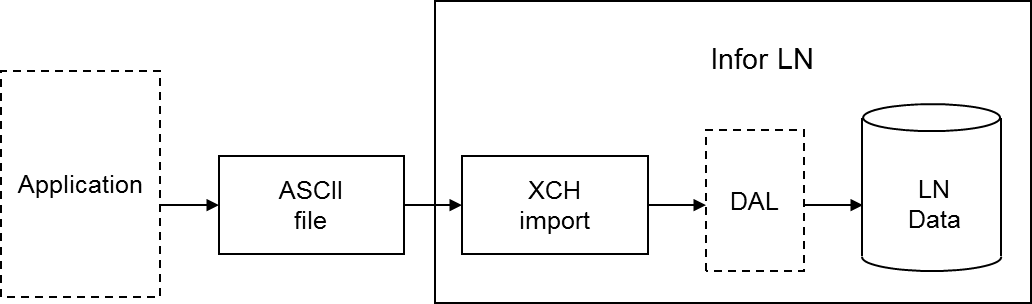
During an Exchange import, you can use all the functionality programmed into the Data Access Layer (DAL). If you use the DAL, Exchange carries out all the constraint checks, integrity checks, and side effects, for example, updates on other tables, that are programmed into the DAL. Database integrity is guaranteed automatically.

Using the DAL reduces the costs of interface development. You can use the DAL to import standard interfaces developed by Infor for partner products, as well as for specific interfaces built by customers, for example, to integrate LN with legacy systems. You can use the DAL in both single site and multisite environments.

The checks or additional actions specified in the DAL are carried out for each row that is imported. Database errors are logged in the same way for DAL and non-DAL import. DAL hook errors are also logged. You can specify whether the DAL property checks are or are not carried out.

If you specify the use of the DAL for a table relation for an import, the dal.new, dal.update, and dal.destroy functions are used instead of db.insert, db.update, and db.delete. You can choose to use DAL for particular tables and not for other tables, therefore, an import batch can contain both types of table relations simultaneously. The import through DAL works for both the import based on audit or indicators (inserts, updates, deletes), and the full import (inserts only).

DAL settings are run time aspects, which means you can change these aspects without having to regenerate the import program. DAL settings are also logged in the log table at batch line level, to enable you to find out what the DAL settings were when the import was run.

Important to realize is that an update through the DAL can result in a number of side effects. Actions performed by the DAL must not be carried out twice. For example, if the DAL updates the available to promise (ATP) quantity for an item when importing order data, the ATP quantity must not be updated in a condition script as well.

For this reason, you must not add any actions in condition scripts, or import additional data, that are already handled in the DAL.
Previous Article Infor LN & Baan Tips & Tricks for EXECUTIVES
Next Article Infor LN & Baan Tips & Tricks for FINANCE: Set Up and Calculate Currency Differences
Print
12403 Rate this article:
5.0
Kathy Barthelt

Kathy BartheltKathy Barthelt

Other posts by Kathy Barthelt

Contact author

x

Categories