Please Wait a Moment
X

Infor LX Tips, Infor LN Tips, BPCS Tips, Baan Tips, Infor M3 Tips & Infor ERP News

Crossroads Connections

Infor ERP Tips & News from the Experts

Infor LX | Infor LN | BPCS | Baan | Infor M3

Infor LX/BPCS Tips & Tricks for FINANCE: Inventory Transaction History to Ledger Book Journal Line Relationship

George Moroses 0 4071 Article rating: 5.0

This enhancement provides IDF relationships from Inventory Transaction History (ITH) to Ledger Book Subsystem Transaction (GXR) and from Ledger Book Subsystem Transaction (GXR) to Ledger Book Journal Line. To implement this enhancement, request and apply MR 81558.

This enhancement provided the following relationships:

  • Inventory Transaction History
  • Relationship to Ledger Book Subsystem Transaction (1 to Many) Default view ‘General’
  • Ledger Book Subsystem card Default view ‘Inventory Processing’
  • Default subset ‘Inventory Processing’

This enhancement provides users with complete traceability from inventory transactions (ITH) to ledger book journal lines (GLH), regardless of how many ledgers are used and journals created. Due to the bi-directional relationship, users can see the source ITH detail from the journal lines.

Webinar Invitation: JumpStart for WebTop Decorators for Infor LX

September 18, 2025 | 12pm CT / 1pm ET

George Moroses 0 3213 Article rating: 5.0

Date: Thursday, September 18, 2025
Time: 12:00 PM CT | 1:00 PM ET

Infor LX users already understand the value of WebTop for simplifying navigation and extending capabilities. In this webinar, we’ll take it a step further and show you how WebTop Decorators can help you customize and streamline your Infor LX experience.

What You’ll Learn

  • How to enable WebTop Designer Mode
  • How to assign Web Administrators
  • How to enable a Grid Decorator
  • …and much more!


Speaker: Nick Olson, Crossroads RMC

Register: https://ibmi.workoutloud.com/Event/-decoratorswebtop/Register/0

👉 Can’t attend live on Thursday? Register for free and we’ll send you the recording after the session.


Additional Opportunity at inPOWER

We’ll also present JumpStart for WebTop Decorators for Infor LX at inPOWER:

The Far-Reaching Impact of Disconnected Data

Kathy Barthelt 0 8589 Article rating: 5.0

Disconnected data doesn’t just slow you down—it creates bottlenecks across your entire business. When your ERP isn’t connected to the systems you rely on, every department feels it.

How Disconnected Data Hurts Your Organization

  • Operations: Spreadsheets and manual order entry waste valuable time.

  • Finance: Budgets, POs, and invoices stuck in silos cause delays and errors.

  • Technology: Teams burn hours exporting data to stay “up to date.”

  • Executives: No single source of truth makes it hard to see the big picture.

A recent study found that 61% of companies face project delays from slow data integration, while employees waste the equivalent of 19 workdays per year moving data between systems. That’s lost productivity you can’t afford.

Why ERP Integration Matters
Your ERP is the heart of your operations. Connecting it to the rest of your business tools unlocks:

  • Real-time data access → no more outdated spreadsheets.

  • Improved communication → one source of truth for every team.

  • Higher productivity → eliminate duplicate entry and manual reporting.

  • Smarter supply chains → better visibility, fewer delays.

  • Sales enablement → reps get live pricing, inventory, and customer data.


Simplify Integration with Infor ION...

Infor LN & Baan Tips & Tricks for OPERATIONS: Subcontracting Overview

Kathy Barthelt 0 19578 Article rating: 5.0

Companies can decide to involve a subcontractor and subcontract part of their activities. The subcontractor carries out the work and returns the products to your company.

In Infor LN, subcontracting is considered as purchasing labor from a third party. Therefore, if a manufacturer wants to subcontract work, he must generate a purchase order to start the subcontracting process. These are the types of subcontracting:

  • Subcontracting with material flow
    • Operation subcontracting: For operation subcontracting, a part of the production process (one or more operations) is subcontracted.
    • Item subcontracting: For item subcontracting, an item's entire production process is subcontracted. Therefore, it is always used with material flow support.
  • Subcontracting without material flow: The simplest form of subcontracting is to generate a subcontracting purchase order to record the operations outsourced to a subcontractor. The subcontracting purchase order only represents the administrative handling of the subcontracting process. When the subcontracted item is received back from the subcontractor, you must close the subcontracting purchase order, which initiates the production process.
  • Unplanned subcontracting: Unplanned subcontracting is applicable when you subcontract after generating a production order. For unplanned subcontracting, a purchase order is generated from the production order and the material supply lines are populated by Shop Floor Control.
  • Service subcontracting: For service subcontracting, work on an item to be maintained or repaired is subcontracted. This work entails the entire repair process, or only a part of it. Service subcontracting can be used with or without material flow support.

To start the subcontracting process, a purchase order is required.

Infor LN & Baan Tips & Tricks for FINANCE: Set Up and Calculate Currency Differences

Kathy Barthelt 0 11522 Article rating: 5.0

To set up and calculate currency differences for foreign currencies:

  • Use the Company Parameters (tfgld0503m000) session to specify the profit and loss ledger accounts, 12 profit and loss dimensions, and transaction type for a posting exchange rate differences that is calculated using the FIFO method. To specify this data, use the Currency Diff. FIFO tab. The reports printed from the Print Company Parameters (tfgld0404m000) session, include the Currency Differences FIFO fields.
  • Use the Calculate Currency Differences (tfgld5201m000) session to calculate the currency differences resulting from transactions posted on accounts for which the field Currency Analysis in the session Chart of Accounts (tfgld0508m000) is set to Required.

Infor LN & Baan Tips & Tricks for TECHNOLOGY: Using the Data Access Layer (DAL)

Kathy Barthelt 0 12388 Article rating: 5.0

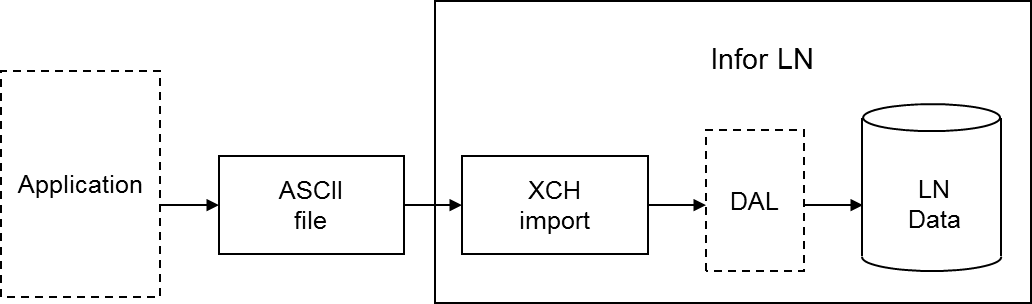
During an Exchange import, you can use all the functionality programmed into the Data Access Layer (DAL). If you use the DAL, Exchange carries out all the constraint checks, integrity checks, and side effects, for example, updates on other tables, that are programmed into the DAL. Database integrity is guaranteed automatically.

Using the DAL reduces the costs of interface development. You can use the DAL to import standard interfaces developed by Infor for partner products, as well as for specific interfaces built by customers, for example, to integrate LN with legacy systems. You can use the DAL in both single site and multisite environments.

The checks or additional actions specified in the DAL are carried out for each row that is imported. Database errors are logged in the same way for DAL and non-DAL import. DAL hook errors are also logged. You can specify whether the DAL property checks are or are not carried out.

If you specify the use of the DAL for a table relation for an import, the dal.new, dal.update, and dal.destroy functions are used instead of db.insert, db.update, and db.delete. You can choose to use DAL for particular tables and not for other tables, therefore, an import batch can contain both types of table relations simultaneously. The import through DAL works for both the import based on audit or indicators (inserts, updates, deletes), and the full import (inserts only).

DAL settings are run time aspects, which means you can change these aspects without having to regenerate the import program. DAL settings are also logged in the log table at batch line level, to enable you to find out what the DAL settings were when the import was run.

Important to realize is that an update through the DAL can result in a number of side effects. Actions performed by the DAL must not be carried out twice. For example, if the DAL updates the available to promise (ATP) quantity for an item when importing order data, the ATP quantity must not be updated in a condition script as well.

For this reason, you must not add any actions in condition scripts, or import additional data, that are already handled in the DAL.
First678911131415Last

Tips:  LX | BPCS | M3

Tips: LN | Baan

Kathy Barthelt

Infor LN & Baan Tips & Tricks for TECHNOLOGY: Data Sharing Methods (Advantages and Disadvantages)

Depending on the multicompany scenario you choose, an implementation team must decide whether or not tables must be logically linked or if data must be synchronized in another way to achieve availability of data across various companies. 

There are 3 ways in which data may be shared among companies. Here are some advantages and disadvantages of each:

  1. Logical Table Linking - If two companies use the same physical data, the physical table exists, or is used, in only one company: the physical company. Each piece occurs only once: one instance of the same data. If the term logical table linking is used, users from multiple companies use a single physical instance of the data. If the company tables are on the same server, this can be accomplished by logical table linking. Access to specific data can be restricted, if required.

    • Advantages: Logical Table Linking takes place in real time; therefore, the moment a record is created or modified in one company, a record becomes available in all other linked companies as well. The setup and maintenance of logical table linking is easier than the setup and maintenance of data replication. Logical table linking is extremely reliable because this type of linking is independent of network connections and user interventions. 

    • Disadvantages: Table sharing implies that all attributes for a record are the same in all companies. Therefore, suppose you share the item table and, for a particular item in a company, the product class is XXX. In this case, in all other companies, the product class for this item must be XXX as well.

  2. Data Replication - In this situation, each company has exactly the same data, but each company has a unique copy of the data. The same piece of data exists in multiple (physical) places: multiple instances of the same data. The process to copy the data is called data replication.

    • Advantages: Rather than using table sharing by means of the logical linking of tables, you can replicate the content of tables between companies. The advantage is that, on company level, some (non-key) attributes of a record can differ by company. For example, if the bills of materials are replicated instead of shared, for each company, you can link a different warehouse to the bill of material. As a result, the bills of materials can be the same across all companies and only the warehouses differ. Using replication, you can also make only a subset of the records available in other companies. For example, if you replicate items between companies, in a sales company, for example, by means of the item group, you can only make end items available. In addition, you can replicate only a subset of items, for example, depending on the item group. Note that replication also requires that the referenced tables are replicated or shared.

    • Disadvantages: Replication is not in real time, and therefore, for processes that require real-time integrated data as the financial integration processes, replication is not an option. For replication, you also must take into account the sequence in which you replicate. First, you must replicate the child tables and then the parent tables, and therefore first the business partners and then the purchase contracts. During the replication process, the data must be frozen. This point is of particular importance if the replication process takes a lot of time.

  3. Manual Syncronization - If only a small number of records are the same between some companies, you can enter, maintain, and keep the records synchronized manually. Note that the more dynamic data is, the more difficult this process is. This solution is strictly procedural. Therefore, depending on the discipline of the users, the solution is error sensitive: data can be forgotten, updated too late, or typing errors may occur.

  • Advantages - The main advantage is the flexibility so that only the data that really must be shared can be kept synchronized. By manually keeping data synchronized, not all attributes of a record need to have the same value.

  • Disadvantages - The main disadvantage is that this method depends on user interaction. Therefore, the method depends on the user’s time - because the method is not a real time procedure and the user may forget to update the data - and users can make mistakes.

Previous Article Infor LN & Baan Tips & Tricks for EXECUTIVES
Next Article Infor LN & Baan Tips & Tricks for FINANCE: Cash Flow Statements (tfgld 0123m100)
Print
47123 Rate this article:
5.0
Kathy Barthelt

Kathy BartheltKathy Barthelt

Other posts by Kathy Barthelt

Contact author

x

Categories