Infor LN & Baan Tips & Tricks for TECHNOLOGY: Using the Data Access Layer (DAL)
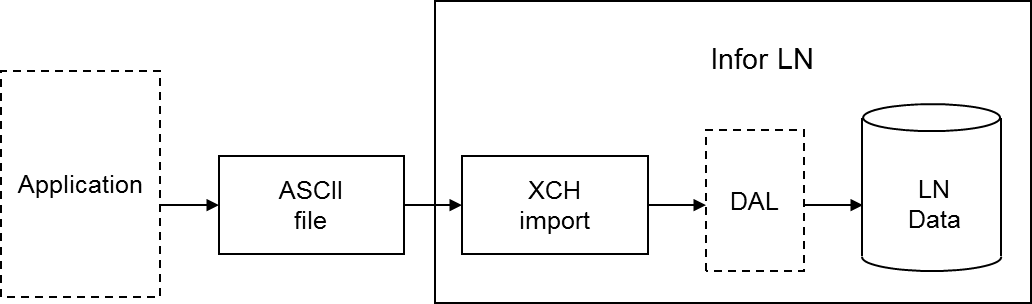
During an Exchange import, you can use all the functionality programmed into the Data Access Layer (DAL). If you use the DAL, Exchange carries out all the constraint checks, integrity checks, and side effects, for example, updates on other tables, that are programmed into the DAL. Database integrity is guaranteed automatically.
Using the DAL reduces the costs of interface development. You can use the DAL to import standard interfaces developed by Infor for partner products, as well as for specific interfaces built by customers, for example, to integrate LN with legacy systems. You can use the DAL in both single site and multisite environments.
The checks or additional actions specified in the DAL are carried out for each row that is imported. Database errors are logged in the same way for DAL and non-DAL import. DAL hook errors are also logged. You can specify whether the DAL property checks are or are not carried out.
If you specify the use of the DAL for a table relation for an import, the dal.new, dal.update, and dal.destroy functions are used instead of db.insert, db.update, and db.delete. You can choose to use DAL for particular tables and not for other tables, therefore, an import batch can contain both types of table relations simultaneously. The import through DAL works for both the import based on audit or indicators (inserts, updates, deletes), and the full import (inserts only).
DAL settings are run time aspects, which means you can change these aspects without having to regenerate the import program. DAL settings are also logged in the log table at batch line level, to enable you to find out what the DAL settings were when the import was run.
Important to realize is that an update through the DAL can result in a number of side effects. Actions performed by the DAL must not be carried out twice. For example, if the DAL updates the available to promise (ATP) quantity for an item when importing order data, the ATP quantity must not be updated in a condition script as well.
For this reason, you must not add any actions in condition scripts, or import additional data, that are already handled in the DAL.